News By Tag Industry News News By Location Country(s) Industry News
| New Feature to Arlyn UpScale Indicator: Data Logging to Google SpreadsheetsBy: Arlyn Scales 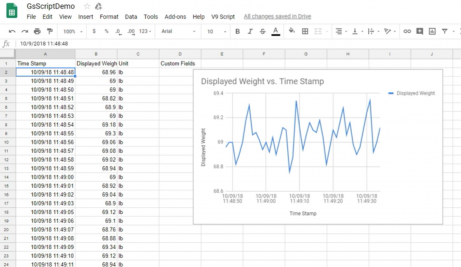
Google Spreadsheet Data Logging with Arlyn UpScale More than likely they might as well be going to bit bucket. The Arlyn UpScale Indicator has an exciting new feature that solves this problem by making your data vastly more accessible. By logging data to Google Spreadsheets, it makes it easy to view weights, date stamps and other vital bits of information from any device capable of running a modern web browser. Real-time analysis and plotting can be accomplished using the tools and add-ons Google Spreadsheets provided for all users. Best off all, by using this technology you could check the progress of filling a container or gas cylinder from your smartphone without needing a special app. Operators seated at regular consumer-grade PCs can find a complete weight history without having to spend a dime on proprietary software solutions. Arlyn Scales makes the UpScale available for any of our industrial units. Live Data Logging Options Users of any industrial scale equipped with an Arlyn UpScale indicator can log data locally to an internal database and then export it to a connected USB device like a thumb drive. However, those who configure one to use the Google Spreadsheets data logging option will have all their information stored directly online. The UpScale is available with both Ethernet and Wi-Fi connectivity, so this is available for almost any type of industrial installation. When the scale collects a specific weight, this is automatically transferred over the network. Operators can observe the process in almost real time. Those with a good connection may even see less than a two second delay. Even then, a two second delay due to the amount of time it takes information to get posted online is quite fast. Some scale vendors have employed complex and rigid web-based logging methods that are too difficult for most companies to incorporate into their business processes. Using a live Google Spreadsheet document is much easier and is therefore useful for those who want to view their scale data logging no matter where they are. Plotting & Analysis with Google Spreadsheets Countless industrial users already have some form of Google account. Access to Gmail generally entitles one to access a Google Spreadsheet as well. This means that nearly all-prospective users already have the possibility of employing a plethora of tools instantly without installing any of them. Users can place a Google Chart inside of a Google Spreadsheet and the software will automatically extract data from it. Since the Arlyn UpScale works in near real-time, this means the chart will update on a regular basis. Google Sheets supports the following types of plots and graphs to make analyzing your object's weight that much easier: • Pie • Scatter • Sparklines • Histogram • Candlestick • Organizational • Tree Map • Column & Bar • Line, Combo & Area Anyone with access to the data can additionally create an annotated timeline designed to show how much the weight of an object has changed over the course of time. This is perhaps most useful for those measuring containers with known tare weights that have to be filled up to a certain level. All weights sent to the connected Google Spreadsheet document are every bit as accurate as any that the underlying hardware can produce. If an operator looks at the digital readout on the Arlyn UpScale Indicator and compares it to the values being entered into the online document, then they'll notice that they're identical. Sharing Data with Your Entire Workflow Once you've logged data to Goggle Spreadsheets, it will allow you to export it in several popular formats. This makes it easy to share information with other divisions of your factory operation. You may also wish to share vital statistics with your clients. Any data logged by the Aryln UpScale to Google Spreadsheets can be downloaded in any of the following formats: • XLS • TXT • HTML • CSV • OpenOffice On top of this, you could create a read-only public link to your ledger. Share this link with anyone and they'll be able to watch you log data in real-time. They won't, however, have permissions to edit anything if an operator doesn't set these permissions so the system will remain secure. Finding an Indicator that Supports Google Spreadsheets USB memory sticks wear out over time and even the most skilled technicians can make mistakes when writing down a measurement. Ordering an Arlyn UpScale display for your industrial scales can solve both of these issues by logging your data directly into an online spreadsheet that's always automatically backed up. Since these indicators work with any of Arlyn Scale's industrial units, they're an extremely flexible solution that can serve the needs of everything from the pharmaceutical industry to those filling propane cylinders. Contact us the moment you're ready to learn more about what these sophisticated digital devices can do for your factory operation. https://www.arlynscales.com/ End
|
| |||||||||||||||||||||||||||||||||||||||||||||



 Account Phone Number